<script>
      const btn = document.getElementsByTagName("button")[0];
      const box = document.querySelector("#box");
      btn.onclick = function () {
        //1、创建对象
        const xhr = new XMLHttpRequest();
        //网络超时设置,超时2s则取消发送
        xhr.timeout = 2000;
        //超时回调函数
        xhr.ontimeout = function () {
          alert("请求超时");
        };
        //网络异常回调、
        xhr.onerror = function () {
          alert("网络异常");
        };
        //2、初始化
        //解决ie缓存问题
        xhr.open("GET", "http://127.0.0.1:8000/delay");
        //3、发送
        xhr.send();
        //4、事件绑定,处理服务端返回的结果
        xhr.onreadystatechange = function () {
          //判断(服务端返回了所有结果)
          if (xhr.readyState === 4) {
            //判断响应状态码 2##表示成功
            if (xhr.status >= 200 && xhr.status < 300) {
              box.innerHTML = xhr.response;
            } else {
            }
          }
        };
      };
    </script>
722_ajax_json格式
<!DOCTYPE html>
<html lang="en">
  <head>
    <meta charset="UTF-8" />
    <meta name="viewport" content="width=device-width, initial-scale=1.0" />
    <title>Document</title>
    <style>
      #box {
        width: 200px;
        height: 100px;
        border: solid 1px pink;
      }
    </style>
  </head>
  <body>
    <div id="box"></div>
    <script>
      const box = document.querySelector("#box");
      window.onkeydown = function () {
        //1、创建对象
        const xhr = new XMLHttpRequest();
        //设置响应体数据类型
        xhr.responseType = "json";
        //2、初始化
        xhr.open("GET", "http://127.0.0.1:8000/json-server");
        //3、发送
        xhr.send();
        //4、事件绑定,处理服务端返回的结果
        xhr.onreadystatechange = function () {
          //判断(服务端返回了所有结果)
          if (xhr.readyState === 4) {
            //判断响应状态码 2##表示成功
            if (xhr.status >= 200 && xhr.status < 300) {
              box.innerHTML = xhr.response.name;
            } else {
            }
          }
        };
      };
    </script>
  </body>
</html>
722_ajax_post请求
2-post.html
<!DOCTYPE html>
<html lang="en">
  <head>
    <meta charset="UTF-8" />
    <meta name="viewport" content="width=device-width, initial-scale=1.0" />
    <title>Document</title>
    <style>
      #box {
        width: 200px;
        height: 100px;
        border: solid 1px pink;
      }
    </style>
  </head>
  <body>
    <div id="box"></div>
    <script>
      const box = document.querySelector("#box");
      box.onmouseover = function () {
        //1、创建对象
        const xhr = new XMLHttpRequest();
        //2、初始化
        xhr.open("POST", "http://127.0.0.1:8000/server");
        //设置请求头
        xhr.setRequestHeader(
          "Content-Type",
          "application/x-www-form-urlencoded"
        );
        //3、发送
        //设置请求体的参数
        xhr.send("a=100&b=200");
        //4、事件绑定,处理服务端返回的结果
        xhr.onreadystatechange = function () {
          //判断(服务端返回了所有结果)
          if (xhr.readyState === 4) {
            //判断响应状态码 2##表示成功
            if (xhr.status >= 200 && xhr.status < 300) {
              box.innerHTML = xhr.response;
            } else {
            }
          }
        };
      };
    </script>
  </body>
</html>
722_ajax_get请求
1-get.html
<!DOCTYPE html>
<html lang="en">
  <head>
    <meta charset="UTF-8" />
    <meta name="viewport" content="width=device-width, initial-scale=1.0" />
    <title>Document</title>
    <style>
      #box {
        width: 200px;
        height: 100px;
        border: solid 1px pink;
      }
    </style>
  </head>
  <body>
    <button>点击发送请求</button>
    <div id="box"></div>
    <script>
      const btn = document.getElementsByTagName("button")[0];
      const box = document.querySelector("#box");
      btn.onclick = function () {
        //1、创建对象
        const xhr = new XMLHttpRequest();
        //2、初始化
        xhr.open("GET", "http://127.0.0.1:8000/server");
        //3、发送
        xhr.send();
        //4、事件绑定,处理服务端返回的结果
        xhr.onreadystatechange = function () {
          //判断(服务端返回了所有结果)
          if (xhr.readyState === 4) {
            //判断响应状态码 2##表示成功
            if (xhr.status >= 200 && xhr.status < 300) {
              //处理结果
              console.log(this);
              //1、响应行
              console.log(xhr.status); //状态码
              console.log(xhr.statusText); //状态字符串
              console.log(xhr.getAllResponseHeaders); //所有的响应头
              console.log(xhr.response); //响应体

              box.innerHTML = xhr.response;
            } else {
            }
          }
        };
      };
    </script>
  </body>
</html>
server.js
const express = require("express");

const app = express();

app.get("/server", (req, res) => {
  //设置运行跨域
  res.setHeader("Access-Control-Allow-Origin", "*");
  res.send("Hello express2");
});

app.post("/server", (req, res) => {
  //设置运行跨域
  res.setHeader("Access-Control-Allow-Origin", "*");
  res.send("Hello express post");
});

app.all("/json-server", (req, res) => {
  //设置运行跨域
  res.setHeader("Access-Control-Allow-Origin", "*");
  //响应一个数据
  const data = {
    name: "lzk",
  };
  //对对象进行字符串转换
  let str = JSON.stringify(data);
  res.send(str);
});

app.listen("8000", () => {
  console.log("8000端口监听中");
});
722_ajax_基本介绍
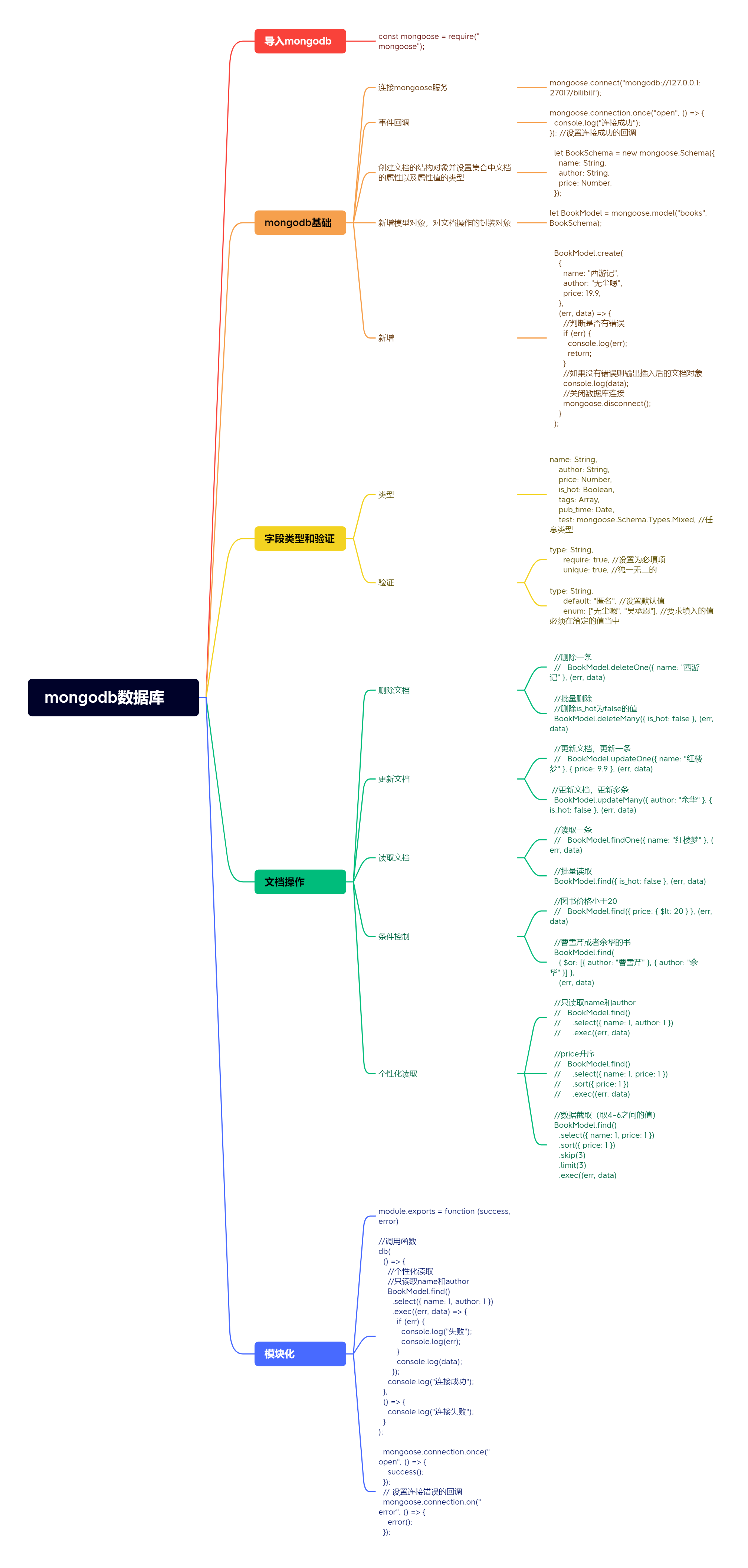
719_mongodb_总结
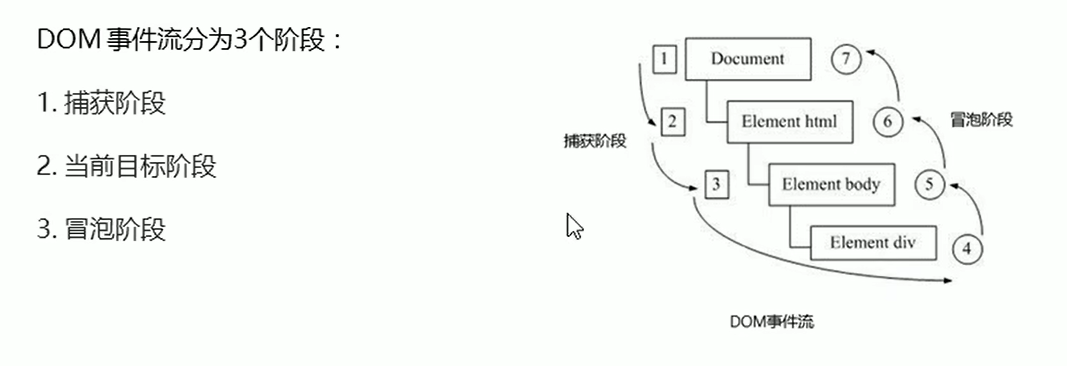
718_DOM事件流三个阶段
<script>
      //DOM事件流三个阶段
      //1、js代码中只能执行捕获阶段或者冒泡其中的一个阶段
      //2、捕获阶段,如果addEventListener第三个参数为true则处于捕获阶段document-html-body-father-son(father先弹出)

      var son = document.querySelector(".son");
      var father = document.querySelector(".father");
      //   son.addEventListener(
      //     "click",
      //     () => {
      //       alert("son");
      //     },
      //     true
      //   );

      //   father.addEventListener(
      //     "click",
      //     () => {
      //       alert("father");
      //     },
      //     true
      //   );

      //3、冒泡阶段,如果addEventListener第三个参数为false或者省略则处于冒泡阶段son-father-body-html-document(son先弹出)
      son.addEventListener(
        "click",
        (e) => {
          alert("son");
          e.cancelBubble = true;
        },
        false
      );

      father.addEventListener("click", () => {
        alert("father");
      });
    </script>
718_预解析
<script>
      //变量预解析和函数预解析
      //变量提升: 就是把所有的变量声明提升到当前作用域的最前面  不提升赋值操作
      //函数提升:就是把所有的函数声明提升到当前作用域的最前面  不调用函数
      console.log(num); //undefined
      var num = 10;

      function fn() {
        console.log(11);
      }
      fn(); //11

      fn(); //11
      function fn() {
        console.log(11);
      }

      //   fun();//报错
      //   var fun = function () {
      //     console.log(22);
      //   };

      var fun = function () {
        console.log(22);
      };
      fun(); //22
    </script>
717_mongodb_代码模块化
index.js
const db = require("./db/db");
const BookModel = require("./models/BookModel");
//调用函数
db(
  () => {
    //个性化读取
    //只读取name和author
    BookModel.find()
      .select({ name: 1, author: 1 })
      .exec((err, data) => {
        if (err) {
          console.log("失败");
          console.log(err);
        }
        console.log(data);
      });
    console.log("连接成功");
  },
  () => {
    console.log("连接失败");
  }
);
db.js
/**
 *
 * @param {*} success 数据库连接成功的回调
 * @param {*} error 数据库连接失败的回调
 */

module.exports = function (success, error) {
  const mongoose = require("mongoose");

  //设置 strictQuery 为 true
  mongoose.set("strictQuery", true);

  //3. 连接 mongodb 服务                        数据库的名称
  mongoose.connect("mongodb://127.0.0.1:27017/bilibili");

  mongoose.connection.once("open", () => {
    success();
  });
  // 设置连接错误的回调
  mongoose.connection.on("error", () => {
    error();
  });

  //设置连接关闭的回调
  mongoose.connection.on("close", () => {
    console.log("连接关闭");
  });
};
BookModel.js
const mongoose = require("mongoose");

let BookSchema = new mongoose.Schema({
  name: String,
  author: String,
  price: Number,
  is_hot: Boolean,
});

//6. 创建模型对象  对文档操作的封装对象    mongoose 会使用集合名称的复数, 创建集合
let BookModel = mongoose.model("novel", BookSchema);

module.exports = BookModel;
717_mongodb_个性化读取
//个性化读取
//只读取name和author
//   BookModel.find()
//     .select({ name: 1, author: 1 })
//     .exec((err, data) => {
//       if (err) {
//         console.log("失败");
//         console.log(err);
//       }
//       console.log(data);
//     });

//price升序
//   BookModel.find()
//     .select({ name: 1, price: 1 })
//     .sort({ price: 1 })
//     .exec((err, data) => {
//       if (err) {
//         console.log("失败");
//         console.log(err);
//       }
//       console.log(data);
//     });

//数据截取(取4-6之间的值)
BookModel.find()
  .select({ name: 1, price: 1 })
  .sort({ price: 1 })
  .skip(3)
  .limit(3)
  .exec((err, data) => {
    if (err) {
      console.log("失败");
      console.log(err);
    }
    console.log(data);
  });