<script>
        function Star(uname, age) {
            this.age = age;
            this.uname = uname;
            this.sing = function () {
                console.log('我爱唱歌');
            }
        }

        var ldh = new Star('刘德华', 18);
        var zxy = new Star('张学友', 58);

        //new在执行时会做的四件事
        //1、在内存中创建一个新的空对象
        //2、让this指向这个新的对象
        //3、执行构造函数里面的代码
        //4、返回这个新对象(所以构造函数里面不需要return)

        ldh.sing()//我爱唱歌

        //1、实例成员就是构造函数内部通过this添加的成员,实例成员只能通过实例化的对象来访问
        console.log(ldh.age);//18

        //2、静态成员就是在构造函数本身上添加的成员,sex就是静态成员
        Star.sex = '男'
        console.log(Star.sex);//男

    </script>
705_路由简介
路由:
一个路由就是一组映射关系(key - value)
router/index.js
//该文件用于创建整个应用的路由器

import VueRouter from "vue-router";
import Home from '../pages/Home';
import About from '../pages/About';
//创建路由器
const router = new VueRouter({
    routes: [
        {
            path: '/about',
            component: About
        },
        {
            path: '/home',
            component: Home
        }
    ]
})

export default router
app
<template>
  <div>
    <div>
      <div class="row">
        <Banner />
        <!-- <div class="col-xs-offset-2 col-xs-8">
          <div class="page-header"><h2>Vue Router Demo</h2></div>
        </div> -->
      </div>
      <div class="row">
        <div class="col-xs-2 col-xs-offset-2">
          <div class="list-group">
            <router-link
              class="list-group-item"
              active-class="active"
              to="/about"
              >About</router-link
            >
            <router-link
              class="list-group-item"
              active-class="active"
              to="/home"
              >Home</router-link
            >

            <!-- <a class="list-group-item active" href="./about.html">About</a>
            <a class="list-group-item" href="./home.html">Home</a> -->
          </div>
        </div>
        <div class="col-xs-6">
          <div class="panel">
            <div class="panel-body">
              <!-- 指定组件的呈现位置 -->
              <router-view></router-view>
            </div>
          </div>
        </div>
      </div>
    </div>
  </div>
</template>

<script>
import Home from "./pages/Home";
import About from "./pages/About";
import Banner from "./components/Banner.vue";
export default {
  name: "App",
  components: { Home, About, Banner },
};
</script>

<style lang="css">
</style>
705_vuex组件数据共享
Person组件:
<template>
  <div>
    <h1>人员列表</h1>
    <h3>Count组件求和为:{{ sum }}</h3>
    <input type="text" placeholder="请输入名字" v-model="name" />
    <button @click="add">添加</button>
    <ul>
      <li v-for="p in personList" :key="p.id">{{ p.name }}</li>
      <li></li>
      <li></li>
      <li></li>
    </ul>
  </div>
</template>

<script>
import { mapState } from "vuex";
import { nanoid } from "nanoid";
export default {
  name: "Person",
  data() {
    return {
      name: "",
    };
  },
  computed: {
    ...mapState(["personList", "sum"]),
  },
  methods: {
    add() {
      const personObj = { id: nanoid(), name: this.name };
      this.$store.commit("ADD_PERSON", personObj);
      this.name = "";
    },
  },
};
</script>

<style>
</style>
Count组件
<template>
  <div>
    <h1>当前求和为:{{ sum }}</h1>
    <h4>当前求和乘以10倍为:{{ bigSum }}</h4>
    <h4>我在{{ school }},学{{ subject }}</h4>
    <h3>Person组件的总人数是:{{ personList.length }}</h3>
    <select v-model="n">
      <!-- value默认是字符串类型,加上":"后 所有冒号里面的内容变成js表达式来解析-->
      <!-- 或者使用 v-model.number="n" 强制类型转换-->
      <option :value="1">1</option>
      <option :value="2">2</option>
      <option :value="3">3</option>
    </select>
    <!-- 要事先传递参数 -->
    <button @click="increment(n)">+</button>
    <button @click="decrement(n)">-</button>
    <button @click="incrementOdd(n)">当前求和为奇数再加</button>
    <button @click="incrementWait(n)">等一等再加</button>
  </div>
</template>

<script>
import { mapState, mapGetters, mapMutations, mapActions } from "vuex";

export default {
  name: "Count",
  data() {
    return {
      n: 1, //用户选择的数字
    };
  },

  methods: {
    //借助mapMutations生成对应的方法,方法会调用commit去联系Mutations
    ...mapMutations({ increment: "JIA", decrement: "JIAN" }),

    //借助mapActations生成对应的方法,方法会调用dispatch去联系actions
    ...mapActions({ incrementOdd: "jiaOdd", incrementWait: "jiaWait" }),
  },
  computed: {
    //借助mapState生成计算属性,从state中读取数据(对象写法)
    ...mapState({
      sum: "sum",
      school: "school",
      subject: "subject",
      personList: "personList",
    }),

    //借助mapState生成计算属性,从state中读取数据(数组写法)
    // ...mapState(['sum','school','subject'])

    ...mapGetters(["bigSum"]),
    // bigSum() {
    //   return this.$store.getters.bigSum;
    // },
  },
};
</script>

<style>
button {
  margin-left: 5px;
}
</style>
705_vuex(map映射简写)
<template>
  <div>
    <h1>当前求和为:{{ sum }}</h1>
    <h4>当前求和乘以10倍为:{{ bigSum }}</h4>
    <h4>我在{{ school }},学{{ subject }}</h4>
    <select v-model="n">
      <!-- value默认是字符串类型,加上":"后 所有冒号里面的内容变成js表达式来解析-->
      <!-- 或者使用 v-model.number="n" 强制类型转换-->
      <option :value="1">1</option>
      <option :value="2">2</option>
      <option :value="3">3</option>
    </select>
    <!-- 要事先传递参数 -->
    <button @click="increment(n)">+</button>
    <button @click="decrement(n)">-</button>
    <button @click="incrementOdd(n)">当前求和为奇数再加</button>
    <button @click="incrementWait(n)">等一等再加</button>
  </div>
</template>

<script>
import { mapState, mapGetters, mapMutations, mapActions } from "vuex";

export default {
  name: "Count",
  data() {
    return {
      n: 1, //用户选择的数字
    };
  },

  methods: {
    //借助mapMutations生成对应的方法,方法会调用commit去联系Mutations
    ...mapMutations({ increment: "JIA", decrement: "JIAN" }),

    //借助mapActations生成对应的方法,方法会调用dispatch去联系actions
    ...mapActions({ incrementOdd: "jiaOdd", incrementWait: "jiaWait" }),
  },
  computed: {
    //借助mapState生成计算属性,从state中读取数据(对象写法)
    ...mapState({ sum: "sum", school: "school", subject: "subject" }),

    //借助mapState生成计算属性,从state中读取数据(数组写法)
    // ...mapState(['sum','school','subject'])

    ...mapGetters(["bigSum"]),
    // bigSum() {
    //   return this.$store.getters.bigSum;
    // },
  },
};
</script>

<style>
button {
  margin-left: 5px;
}
</style>
630_vuex简介
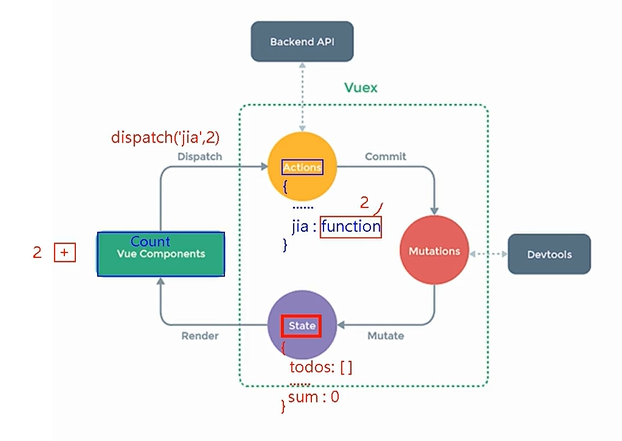
概念:专门在 Vue 中实现集中式状态(数据)管理的一个 Vue 插件,对 vue 应用中多个组件的共享状态进行集中式的管理(读/写),也是一种组件间通信的方式,且适用于任意组件间通信。
store/index.js
//该文件用于创建Vuex中最为核心的store
import Vue from 'vue'
import Vuex from 'vuex'
Vue.use(Vuex)
//使用Vuex

//准备actions用于响应组件里面的动作
const actions = {
    // jia: function (context, value) {
    //     context.commit('JIA', value)
    // },
    jian(context, value) {
        context.commit('JIAN', value)
    },
    jiaOdd(context, value) {
        if (context.state.sum % 2) {
            context.commit('JIA', value)
        }
    },
    jiaWait(context, value) {
        setTimeout(() => {
            context.commit('JIA', value)
            // this.sum += this.n;
        }, 500);
    }

    // this.$store.dispatch("jia", this.n);
}

//准备mutations用于操作数据
const mutations = {
    JIA(state, value) {
        state.sum += value
    },
    JIAN(state, value) {
        state.sum -= value
    },

}

//准备state用于存储数据
const state = {
    sum: 0, //当前的和
}

const store = new Vuex.Store({
    actions,
    mutations,
    state
})

export default store
Count.vue
<template>
  <div>
    <h1>当前求和为:{{ $store.state.sum }}</h1>
    <select v-model="n">
      <!-- value默认是字符串类型,加上":"后 所有冒号里面的内容变成js表达式来解析-->
      <!-- 或者使用 v-model.number="n" 强制类型转换-->
      <option :value="1">1</option>
      <option :value="2">2</option>
      <option :value="3">3</option>
    </select>
    <button @click="increment">+</button>
    <button @click="decrement">-</button>
    <button @click="incrementOdd">当前求和为奇数再加</button>
    <button @click="incrementWait">等一等再加</button>
  </div>
</template>

<script>
export default {
  name: "Count",
  data() {
    return {
      n: 1, //用户选择的数字
    };
  },
  methods: {
    //VueComponent可以直接向mutations提交数据,不经过actions
    increment() {
      this.$store.commit("JIA", this.n);
      // this.sum += this.n;
    },
    decrement() {
      this.$store.dispatch("jian", this.n);
      // this.sum -= this.n;
    },
    incrementOdd() {
      // if (this.sum % 2) {
      //   this.sum += this.n;
      // }
      this.$store.dispatch("jiaOdd", this.n);
    },
    incrementWait() {
      this.$store.dispatch("jiaWait", this.n);
    },
  },
};
</script>

<style>
button {
  margin-left: 5px;
}
</style>
628_作用域插槽
插槽:
让父组件可以向子组件指定位置插入html结构,也是一种组件通信的方式,适用于子传父
作用域插槽:
数据在组件自身,但数据生成的结构需要使用者来决定
App组件:
<template>
  <div class="container">
    <category title="游戏">
      <template scope="{game}">
        <!-- ES6解构赋值-->
        <ul>
          <li v-for="(g, index) in game" :key="index">{{ g }}</li>
        </ul>
      </template>
    </category>

    <category title="游戏">
      <template scope="{game}">
        <!-- ES6解构赋值-->
        <ol>
          <li v-for="(g, index) in game" :key="index">{{ g }}</li>
        </ol>
      </template>
    </category>

    <category title="游戏">
      <template scope="{game}">
        <!-- ES6解构赋值-->

        <h4 v-for="(g, index) in game" :key="index">{{ g }}</h4>
      </template>
    </category>
  </div>
</template>

<script>
import Category from "./components/Category.vue";

export default {
  name: "App",
  components: { Category },
};
</script>

<style lang="css">
.container,
.foot {
  display: flex;
  justify-content: space-around;
}
img {
  width: 100%;
}
h4 {
  text-align: center;
}
</style>
Category组件:
<template>
  <div class="container">
    <category title="游戏">
      <template scope="{game}">
        <!-- ES6解构赋值-->
        <ul>
          <li v-for="(g, index) in game" :key="index">{{ g }}</li>
        </ul>
      </template>
    </category>

    <category title="游戏">
      <template scope="{game}">
        <!-- ES6解构赋值-->
        <ol>
          <li v-for="(g, index) in game" :key="index">{{ g }}</li>
        </ol>
      </template>
    </category>

    <category title="游戏">
      <template scope="{game}">
        <!-- ES6解构赋值-->

        <h4 v-for="(g, index) in game" :key="index">{{ g }}</h4>
      </template>
    </category>
  </div>
</template>

<script>
import Category from "./components/Category.vue";

export default {
  name: "App",
  components: { Category },
};
</script>

<style lang="css">
.container,
.foot {
  display: flex;
  justify-content: space-around;
}
img {
  width: 100%;
}
h4 {
  text-align: center;
}
</style>
628_默认插槽
App组件:
<template>
  <div class="container">
    <category title="美食">
      <img
        src="https://img95.699pic.com/photo/50089/9896.jpg_wh300.jpg"
        alt=""
      />
    </category>

    <category title="游戏" :listData="game">
      <ul>
        <li v-for="(g, index) in game" :key="index">{{ g }}</li>
      </ul>
    </category>

    <category title="电影">
      <li v-for="(m, index) in movie" :key="index">{{ m }}</li>
    </category>
  </div>
</template>

<script>
import Category from "./components/Category.vue";

export default {
  name: "App",
  components: { Category },
  data() {
    return {
      food: ["米饭", "面条", "烧烤", "啤酒"],
      game: ["腾讯", "网易", "元神", "lol"],
      movie: ["蜘蛛侠", "金刚", "星际", "深海"],
    };
  },
};
</script>

<style lang="css">
.container {
  display: flex;
  justify-content: space-around;
}
img {
  width: 100%;
}
</style>
Category组件:
<template>
  <div class="category">
    <h3>{{ title }}</h3>
    <!-- 定义一个插槽:(挖个坑,等着组件里面的使用者进行填充) -->
    <slot>我是一个默认值,当使用者没有使用,我会出现</slot>
    <!-- <ul>
      <li v-for="(item, index) in listData" :key="index">{{ item }}</li>
    </ul> -->
  </div>
</template>

<script>
export default {
  name: "Category",
  props: ["title"],
};
</script>

<style>
.category {
  background-color: skyblue;
  width: 200px;
  height: 300px;
}
h3 {
  text-align: center;
  background-color: orange;
}
</style>
628_具名插槽
App组件:
<template>
  <div class="container">
    <category title="美食">
      <img
        src="https://img95.699pic.com/photo/50089/9896.jpg_wh300.jpg"
        alt=""
        slot="center"
      />
      <a href="http://lzkpersonal.com.cn" slot="footer">我的博客</a>
    </category>

    <category title="游戏" :listData="game">
      <ul slot="center">
        <li v-for="(g, index) in game" :key="index">{{ g }}</li>
      </ul>

      <template slot="footer">
        <div class="foot">
          <a href="http://lzkpersonal.com.cn" slot="footer">单机游戏</a>
          <a href="http://lzkpersonal.com.cn" slot="footer">网络游戏</a>
        </div>
        <h4>欢迎来到我的世家</h4>
      </template>
    </category>

    <category title="电影">
      <ul slot="center">
        <li v-for="(m, index) in movie" :key="index">{{ m }}</li>
      </ul>
    </category>
  </div>
</template>

<script>
import Category from "./components/Category.vue";

export default {
  name: "App",
  components: { Category },
  data() {
    return {
      food: ["米饭", "面条", "烧烤", "啤酒"],
      game: ["腾讯", "网易", "元神", "lol"],
      movie: ["蜘蛛侠", "金刚", "星际", "深海"],
    };
  },
};
</script>

<style lang="css">
.container,
.foot {
  display: flex;
  justify-content: space-around;
}
img {
  width: 100%;
}
h4 {
  text-align: center;
}
</style>
Category组件:
<template>
  <div class="category">
    <h3>{{ title }}</h3>
    <!-- 定义一个插槽:(挖个坑,等着组件里面的使用者进行填充) -->
    <slot name="center">我是一个默认值,当使用者没有使用,我会出现</slot>
    <slot name="footer">我是一个默认值,当使用者没有使用,我会出现</slot>
    <!-- <ul>
      <li v-for="(item, index) in listData" :key="index">{{ item }}</li>
    </ul> -->
  </div>
</template>

<script>
export default {
  name: "Category",
  props: ["title"],
};
</script>

<style>
.category {
  background-color: skyblue;
  width: 200px;
  height: 300px;
}
h3 {
  text-align: center;
  background-color: orange;
}
</style>
627_组件间通信(props)
App组件:
<template>
  <div>
    <Input :receive="receive" />
    <Output :data1="data1" />
    <!-- 向Output组件传递data1 -->
  </div>
</template>

<script>
import Input from "./components/Input";
import Output from "./components/Output";

export default {
  name: "App",
  components: { Input, Output },
  data() {
    return {
      data1: "",
    };
  },
  methods: {
    receive(title) {
      this.data1 = title; //将Input传递过来的值赋值给data1
    },
  },
};
</script>
Input组件:
<template>
  <div class="demo">
    <input type="text" v-model="title" />
    <button @click="addDo">添加</button>
  </div>
</template>

<script>
export default {
  name: "Input",
  props: ["receive"],
  data() {
    return {
      title: "",
    };
  },
  methods: {
    addDo() {
      this.receive(this.title);
      //只要上面的button一点击,就会执行addDo这个函数,触发receive函数的执行,接收title的值
    },
  },
};
</script>

<style>
</style>
Output组件:
<template>
  <div>
    <textarea v-model="data1"></textarea>
  </div>
</template>

<script>
export default {
  name: "Output",
  props: ["data1"],
  data() {
    return {};
  },
};
</script>

<style lang="css">
textarea {
  width: 500px;
  height: 500px;
}
</style>
627_全局事件总线
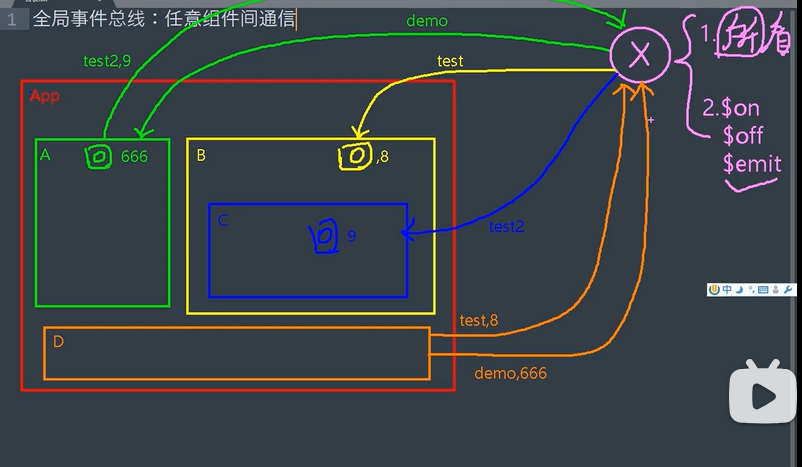
全局事件总线:实现任意组件之间的通信。
main.js
// 引入Vue
import Vue from 'vue'
// 引入App
import App from './App.vue'
// 关闭生产提示

// const Demo = Vue.extend({})
// const d = new Demo()
//构建组件的实例对象d

// Vue.prototype.x = d
//VueComponent.prototype.__proto__===Vue.protitype
//组件实例对象(vc)可以访问到Vue原型上的属性和方法

Vue.config.productionTip = false

new Vue({
  el: '#app',
  //将App组件放入容器
  render: h => h(App),
  beforeCreate() {
    Vue.prototype.$bus = this
    //安装全局事件总线,$bus就是当前应用的vm
  }
})
School.vue
<template>
  <div class="sch">
    <h2>学校名称:{{ name }}</h2>
    <h2>学校地址:{{ address }}</h2>
  </div>
</template>

<script>
export default {
  name: "School",
  data() {
    return {
      name: "西南大学",
      address: "中软国际",
    };
  },
  mounted() {
    //console.log("School", this);
    //给School组件绑定了$bus,等待其他事件的触发
    this.$bus.$on("hello", (data) => {
      console.log("我是School组件,收到了数据", data);
    });
  },
  beforeDestroy() {
    this.$bus.$off("hello"); //用完了把当前组件所用到的事件解绑
  },
};
</script>

<style scope>
.sch {
  background-color: skyblue;
}
</style>
Student.vue
<template>
  <div class="stu">
    <h2>学生姓名:{{ name }}</h2>
    <h2>学生性别:{{ sex }}</h2>
    <button @click="sendStudentName">把学生名给School组件</button>
  </div>
</template>

<script>
export default {
  name: "Student",
  data() {
    return {
      name: "卢航我儿",
      sex: "男",
    };
  },
  methods: {
    sendStudentName() {
      this.$bus.$emit("hello", this.name);
    },
  },
};
</script>

<style scope>
.stu {
  background-color: orange;
}
</style>