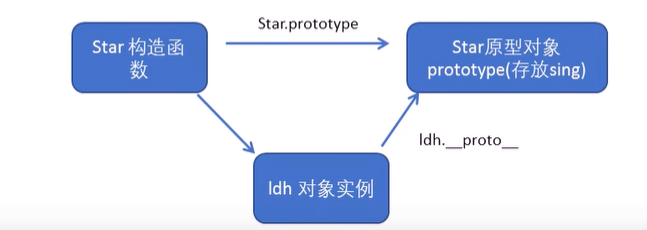
作用:
让不展示的路由组件保持挂载,不被销毁
缓存一个组件
<keep-alive include="News">
    <router-view></router-view>
</keep-alive>
缓存多个组件
<keep-alive :include="['News','Message']">
    <router-view></router-view>
</keep-alive>作用:
让不展示的路由组件保持挂载,不被销毁
缓存一个组件
<keep-alive include="News">
<router-view></router-view>
</keep-alive>缓存多个组件
<keep-alive :include="['News','Message']">
<router-view></router-view>
</keep-alive>Message.vue
<template>
<div>
<ul>
<li v-for="m in messageList" :key="m.id">
<!-- 路由跳转并携带params参数,to的字符串写法 -->
<!-- <router-link :to="`/home/message/detail/${m.id}/${m.title}`">{{
m.title
}}</router-link> -->
<!-- 路由跳转并携带params参数,to的对象写法 -->
<!-- 采用这种写法path必须采用name的形式 -->
<router-link
:to="{
name: 'xiangqing',
query: {
id: m.id,
title: m.title,
},
}"
>{{ m.title }}</router-link
>
<button @click="pushShow(m)">push查看</button>
<button @click="replaceShow(m)">replace查看</button>
</li>
<hr />
<router-view></router-view>
<!-- <li><a href="/message2">message002</a> </li>
<li><a href="/message/3">message003</a> </li> -->
</ul>
</div>
</template>
<script>
export default {
name: "Message",
data() {
return {
messageList: [
{ id: "001", title: "消息001" },
{ id: "002", title: "消息002" },
{ id: "003", title: "消息003" },
],
};
},
methods: {
//push可以控制页面跳转,replace不储存上一次页面跳转的内容
pushShow(m) {
this.$router.push({
name: "xiangqing",
query: {
id: m.id,
title: m.title,
},
});
},
replaceShow(m) {
this.$router.replace({
name: "xiangqing",
query: {
id: m.id,
title: m.title,
},
});
},
},
};
</script>
<style>
</style>Banner.vue
<template>
  <div class="col-xs-offset-2 col-xs-8">
    <div class="page-header">
      <h2>Vue Router Demo</h2>
      <button @click="back">后退</button>
      <button @click="forward">前进</button>
    </div>
  </div>
</template>

<script>
export default {
  name: "Banner",
  methods: {
    back() {
      //back()表示回退上一级
      this.$router.back();
    },
    forward() {
      //forward表示回到下一级
      this.$router.forward();
    },
  },
};
</script>

<style>
</style><template>
<div>
<ul>
<li v-for="m in messageList" :key="m.id">
<!-- 路由跳转并携带params参数,to的字符串写法 -->
<!-- <router-link :to="`/home/message/detail/${m.id}/${m.title}`">{{
m.title
}}</router-link> -->
<!-- 路由跳转并携带params参数,to的对象写法 -->
<!-- 采用这种写法path必须采用name的形式 -->
<router-link
:to="{
name: 'xiangqing',
params: {
id: m.id,
title: m.title,
},
}"
>{{ m.title }}</router-link
>
</li>
<hr />
<router-view></router-view>
<!-- <li><a href="/message2">message002</a> </li>
<li><a href="/message/3">message003</a> </li> -->
</ul>
</div>
</template>
<script>
export default {
name: "Message",
data() {
return {
messageList: [
{ id: "001", title: "消息001" },
{ id: "002", title: "消息002" },
{ id: "003", title: "消息003" },
],
};
},
};
</script>
<style>
</style>router/index.js
//该文件用于创建整个应用的路由器

import VueRouter from "vue-router";
import Home from '../pages/Home';
import About from '../pages/About';
import Message from "../pages/Message";
import News from "../pages/News"
import Detail from "../pages/Detail"
//创建路由器
const router = new VueRouter({
    routes: [
        {
            name: 'guanyu',
            path: '/about',
            component: About
        },
        {
            path: '/home',
            component: Home,
            children: [
                {
                    path: 'news',//二级路由不用加/
                    component: News,
                },
                {
                    path: 'message',//二级路由不用加/
                    component: Message,
                    children: [
                        {
                            name: 'xiangqing',
                            path: 'detail',
                            component: Detail,
                        }
                    ]
                },
            ]
        }
    ]
})

export default router
Message.vue
<template>
<div>
<ul>
<li v-for="m in messageList" :key="m.id">
<!-- 路由跳转并携带query参数,to的字符串写法 -->
<!-- <router-link :to="`/home/message/detail?id=${m.id}&title=${m.title}`">{{
m.title
}}</router-link
> -->
<!-- 路由跳转并携带query参数,to的对象写法 -->
<router-link
:to="{
name: 'xiangqing',
query: {
id: m.id,
title: m.title,
},
}"
>{{ m.title }}</router-link
>
</li>
<hr />
<router-view></router-view>
<!-- <li><a href="/message2">message002</a> </li>
<li><a href="/message/3">message003</a> </li> -->
</ul>
</div>
</template>
<script>
export default {
name: "Message",
data() {
return {
messageList: [
{ id: "001", title: "消息001" },
{ id: "002", title: "消息002" },
{ id: "003", title: "消息003" },
],
};
},
};
</script>
<style>
</style>Detail.vue
<template>
  <ul>
    <li>消息编号:{{ $route.query.id }}</li>
    <li>消息标题:{{ $route.query.title }}</li>
  </ul>
</template>

<script>
export default {
  name: "Detail",
};
</script>

<style>
</style>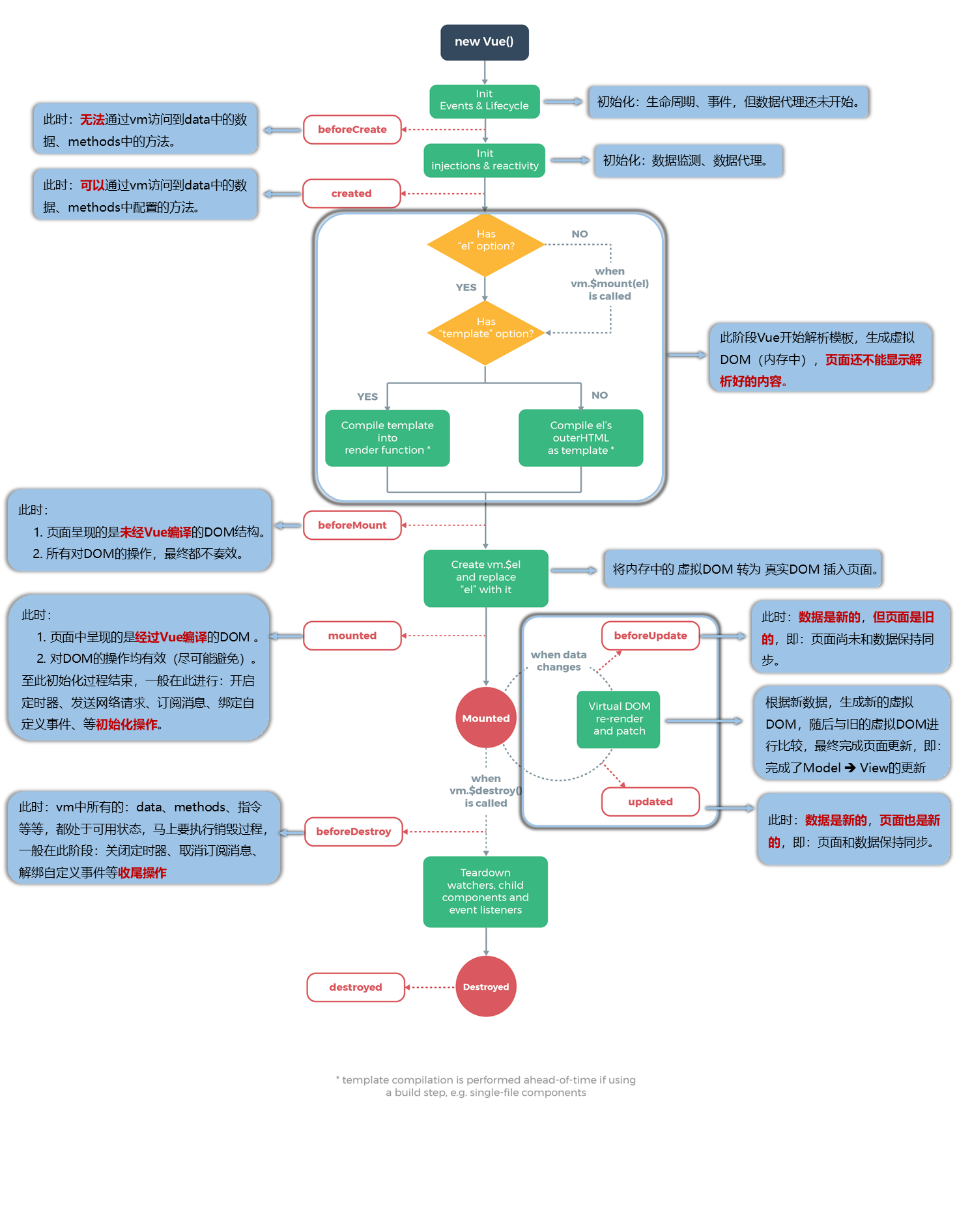
<body>
    <div id="root">
        <h1 :style="{opacity}">欢迎学习</h1>
    </div>

    <script type="text/javascript">
        //创建Vue实例
        const x = new Vue({
            el: '#root',
            //用于指定Vue为哪一个容器服务,值通常为css选择器字符串
            // el: document.getElementById('root')
            data: {
                opacity: 1
            },
            //当Vue完成模板解析,并把初始真实DOM元素放入到页面上(完成挂载)调用mounted
            //mounted里面的this指向为vm
            mounted() {
                setInterval(() => {
                    this.opacity -= 0.01;
                    if (this.opacity <= 0) {
                        this.opacity = 1
                    }
                }, 16)
            },
        })
    </script>
</body><body>
<div id="root">
<!-- 绑定class样式,字符串写法,适用于:样式的类名不确定,需要动态指定 -->
<div class="basic" :class="mood" @click="changeMood">{{name}}</div><br />
<!-- 绑定class样式,数组写法,适用于:要绑定的样式个数不确定,名字也不确定 -->
<div class="basic" :class="a">{{name}}</div><br />
<!-- 绑定class样式,对象写法,适用于:要绑定的样式个数确定,名字确定,动态决定用不用 -->
<div class="basic" :class="classObj">{{name}}</div><br />
<!-- 绑定style样式,对象写法 -->
<div class="basic" :style="styleObj">{{name}}</div>
</div>
<script type="text/javascript">
//创建Vue实例
const x = new Vue({
el: '#root',
//用于指定Vue为哪一个容器服务,值通常为css选择器字符串
// el: document.getElementById('root')
data: {
name: '西南大学',
mood: 'red',
a: ['a1', 'a2', 'a3'],
classObj: {
a1: false,//为false就是不应用,为true就是应用
a2: false
},
styleObj: {
fontSize: '40px'
}
},
//data用于存放数据,数据供el所指定容器服务
methods: {
changeMood() {
const arr = ['green', 'red', 'zise']
const index = Math.floor(Math.random() * 3)
this.mood = arr[index]
}
},
})
</script>
</body>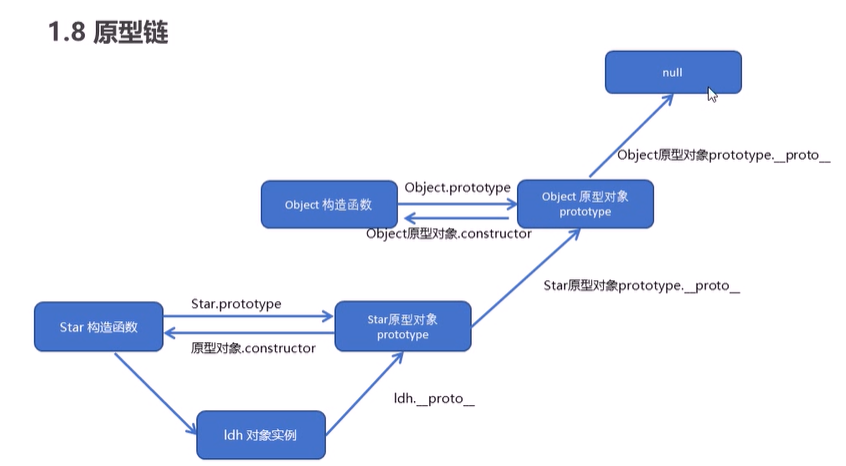
<script>
        function Star(uname, age) {
            this.uname = uname;
            this.age = age;
        }

        // Star.prototype.sing = function () {
        //     console.log('我会唱歌');
        // }
        Star.prototype = {
            //constructor指向的是构造函数本身,如果使用对象赋值的操作会使得constructor被覆盖,所以必须重新指回构造函数
            constructor: Star,
            sing: function () {
                console.log('我会唱歌');
            },
            dance: function () {
                console.log('我会跳舞');
            }
        }
        //原型对象存放公共的函数和方法

        var ldh = new Star('刘德华', 18);
        console.log(ldh);
        //对象上有系统添加的一个__proto__对象原型,指向我们构造函数的原型对象
        ldh.sing();
        console.log(ldh.__proto__ === Star.prototype);//true

        console.log(ldh.__proto__.sing());
        console.log(Star.prototype.dance());
        console.log(ldh.__proto__.constructor);//构造函数
        console.log(Star.prototype.constructor);//构造函数
        console.log(Star.prototype);
</script><script>
function Star(uname, age) {
this.age = age;
this.uname = uname;
}
Star.prototype.sing = function () {
console.log('我爱唱歌');
}
//为节省内存,不另外开辟内存空间,把公共方法定义在原型对象身上
var ldh = new Star('刘德华', 18);
var zxy = new Star('张学友', 58);
ldh.sing()//我爱唱歌
console.log(ldh.age);//18
console.log(ldh.sing === zxy.sing);//true
console.log(ldh.__proto__ === Star.prototype);//true
//对象身上系统自己会添加一个__proto__指向构造函数的原型对象
//方法的查找:
//1、首先看ldh身上是否有相应的sing方法,如果有就执行这个对象身上的sing
//2、如果有sing这个方法,因为有__proto__的存在,就会去构造函数原型对象prototype身上查找
</script>