<script>
      arr = [1, 2, 3, 4, 5];
      //   arr.forEach((item) => {
      //     if (item == 3) {
      //       console.log("找到了目标元素");
      //       return true; //若遇到return true不会终止遍历
      //     }
      //     console.log(111);
      //   });

      arr.some((item) => {
        if (item == 3) {
          console.log("找到了目标元素");
          return true; //若遇到return true会终止遍历
        }
        console.log(111);
      });
    </script>
712_call方法
<script>
      function fn(x, y) {
        console.log("111222");
        console.log(this);
      }

      let o = {
        name: 12,
      };

      //可以调用函数
      fn.call();
      //第一个参数可以修改this指向
      fn.call(o, 1, 2);
    </script>
712_原型对象的this指向
<script>
      function Star(uname, age) {
        this.uname = uname;
        this.age = age;
      }

      var that;
      Star.prototype.sing = function () {
        console.log("我会唱歌");
        that = this;
      };

      //1、原型对象和构造函数里面的this指向的都是实例对象ldh
      console.log(that);
    </script>
712_express框架_路由参数练习
const express=require('express')

//导入json文件
const {singers}=require('./singers.json')

//创建应用对象
const app=express()

//创建路由
app.get('/singer/:id.html',(req,res)=>{
    //获取路由参数
    let {id}=req.params
    //在数组中寻找对应的id数据
    let result=singers.find(item=>{
        if(item.id===Number(id)){
            return true;
        }
    })
    console.log(result);
    res.end(`
<!DOCTYPE html>
<html lang="en">
<head>
    <meta charset="UTF-8">
    <meta name="viewport" content="width=device-width, initial-scale=1.0">
    <title>Document</title>
</head>
<body>
    <h2>${result.singer_name}</h2>
    <img src="${result.singer_pic}" alt="">
</body>
</html>`)
})

//监听端口,启动服务
app.listen(3000,()=>{
    console.log('服务已经启动');
})
711_express框架_获取路由参数
const express=require('express')
//创建应用对象
const app=express()

//创建路由
app.get('/:id.html',(req,res)=>{
    //获取URL路哟与参数
    console.log(req.params.id);

    res.setHeader('content-type','text/html;chartset=utf-8')
    res.end('hello express')
})

//监听端口,启动服务
app.listen(3000,()=>{
    console.log('服务已经启动');
})
711_express框架_获取请求参数
const express=require('express')
//创建应用对象
const app=express()

//创建路由
app.get('/request',(req,res)=>{

    //express操作
    console.log(req.path);//获取请求路径
    console.log(req.query);//获取查询字符串

    console.log(req.get('host'));//获取host请求头
    res.end('hello express')
})

//监听端口,启动服务
app.listen(3000,()=>{
    console.log('服务已经启动');
})
711_express框架_路由
//导入express
const express=require('express')

//创建应用对象
const app=express()

//创建路由
app.get('/home',(req,res)=>{
    res.end('hello express')
})

//请求方法随意(get,post都可以)
app.all('/test',(req,res)=>{
    res.end('test')
})

//404响应
app.all('*',(req,res)=>{
    res.end('404 not Found')
})

//监听端口,启动服务
app.listen(3000,()=>{
    console.log('服务已经启动');
})
711_express框架_初体验
//导入express
const express=require('express')
//创建应用对象
const app=express()

//创建路由
app.get('/home',(req,res)=>{
    res.end('hello express')
})

//监听端口,启动服务
app.listen(3000,()=>{
    console.log('服务已经启动');
})
710_模块化_模块暴露数据
index.js
//声明一个函数
function tiemo(){
    console.log('贴膜');
}

function niejiao(){
    console.log('捏脚');
}

//module暴露数据
// module.exports={
//     tiemo,
//     niejiao
// }

//exports暴露数据
// exports.niejiao=niejiao;
// exports.tiemo=tiemo;

//module.exports 可以暴露任意数据
module.exports='iloveyou'

//module.exports===exports
me.js
//导入模块
const me=require('./me.js')

//调用函数
// me.tiemo();
// me.niejiao();

console.log(me);
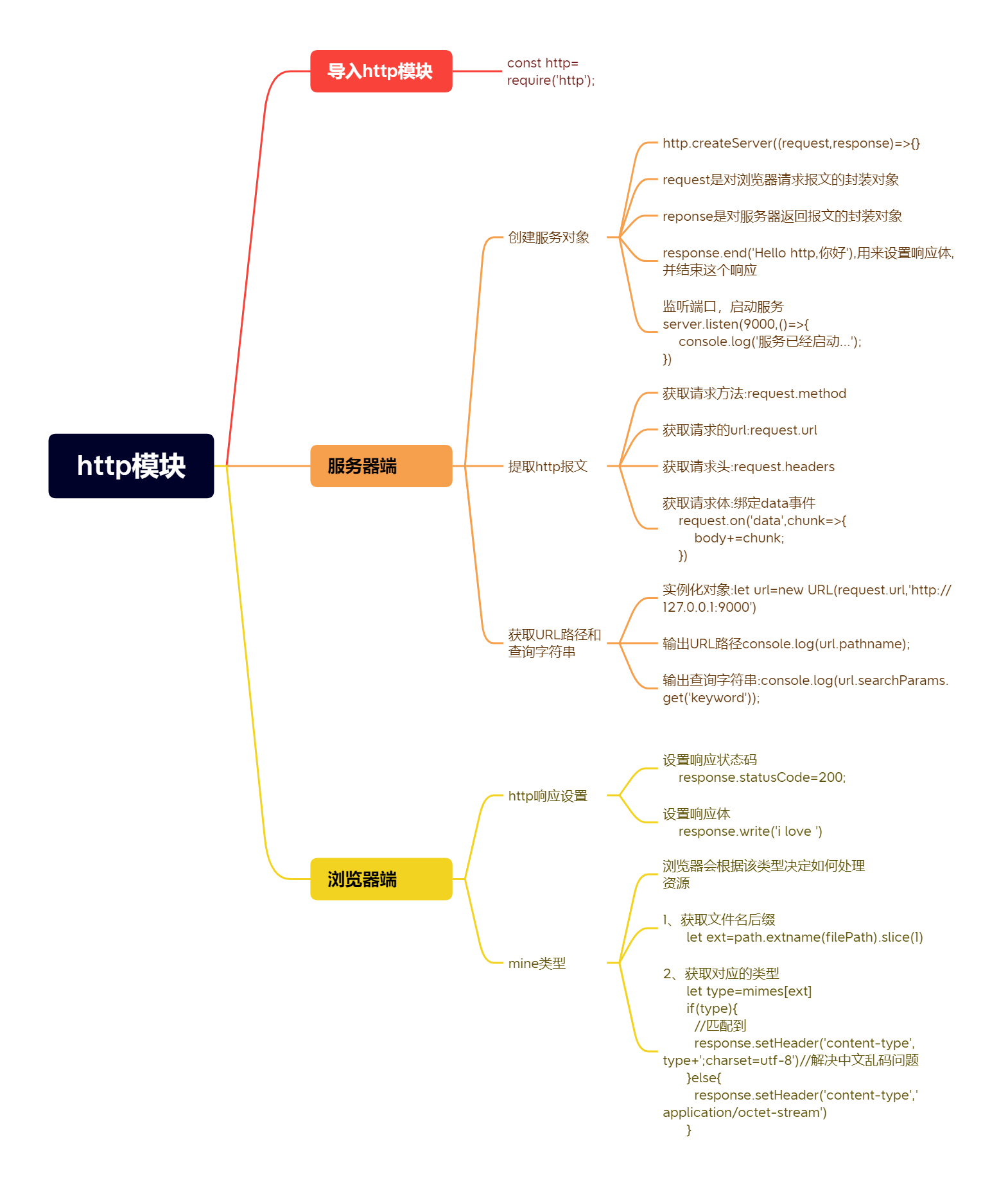
710_http模块小结