全局事件总线:实现任意组件之间的通信。
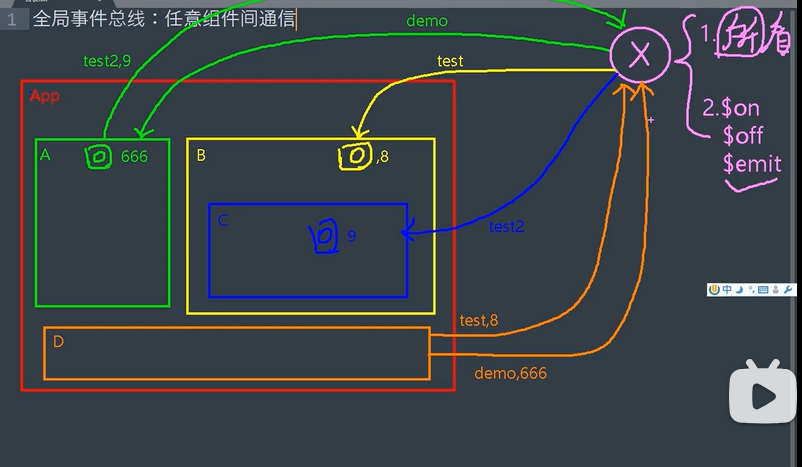
main.js
// 引入Vue
import Vue from 'vue'
// 引入App
import App from './App.vue'
// 关闭生产提示

// const Demo = Vue.extend({})
// const d = new Demo()
//构建组件的实例对象d

// Vue.prototype.x = d
//VueComponent.prototype.__proto__===Vue.protitype
//组件实例对象(vc)可以访问到Vue原型上的属性和方法

Vue.config.productionTip = false

new Vue({
  el: '#app',
  //将App组件放入容器
  render: h => h(App),
  beforeCreate() {
    Vue.prototype.$bus = this
    //安装全局事件总线,$bus就是当前应用的vm
  }
})
School.vue
<template>
  <div class="sch">
    <h2>学校名称:{{ name }}</h2>
    <h2>学校地址:{{ address }}</h2>
  </div>
</template>

<script>
export default {
  name: "School",
  data() {
    return {
      name: "西南大学",
      address: "中软国际",
    };
  },
  mounted() {
    //console.log("School", this);
    //给School组件绑定了$bus,等待其他事件的触发
    this.$bus.$on("hello", (data) => {
      console.log("我是School组件,收到了数据", data);
    });
  },
  beforeDestroy() {
    this.$bus.$off("hello"); //用完了把当前组件所用到的事件解绑
  },
};
</script>

<style scope>
.sch {
  background-color: skyblue;
}
</style>
Student.vue
<template>
  <div class="stu">
    <h2>学生姓名:{{ name }}</h2>
    <h2>学生性别:{{ sex }}</h2>
    <button @click="sendStudentName">把学生名给School组件</button>
  </div>
</template>

<script>
export default {
  name: "Student",
  data() {
    return {
      name: "卢航我儿",
      sex: "男",
    };
  },
  methods: {
    sendStudentName() {
      this.$bus.$emit("hello", this.name);
    },
  },
};
</script>

<style scope>
.stu {
  background-color: orange;
}
</style>